



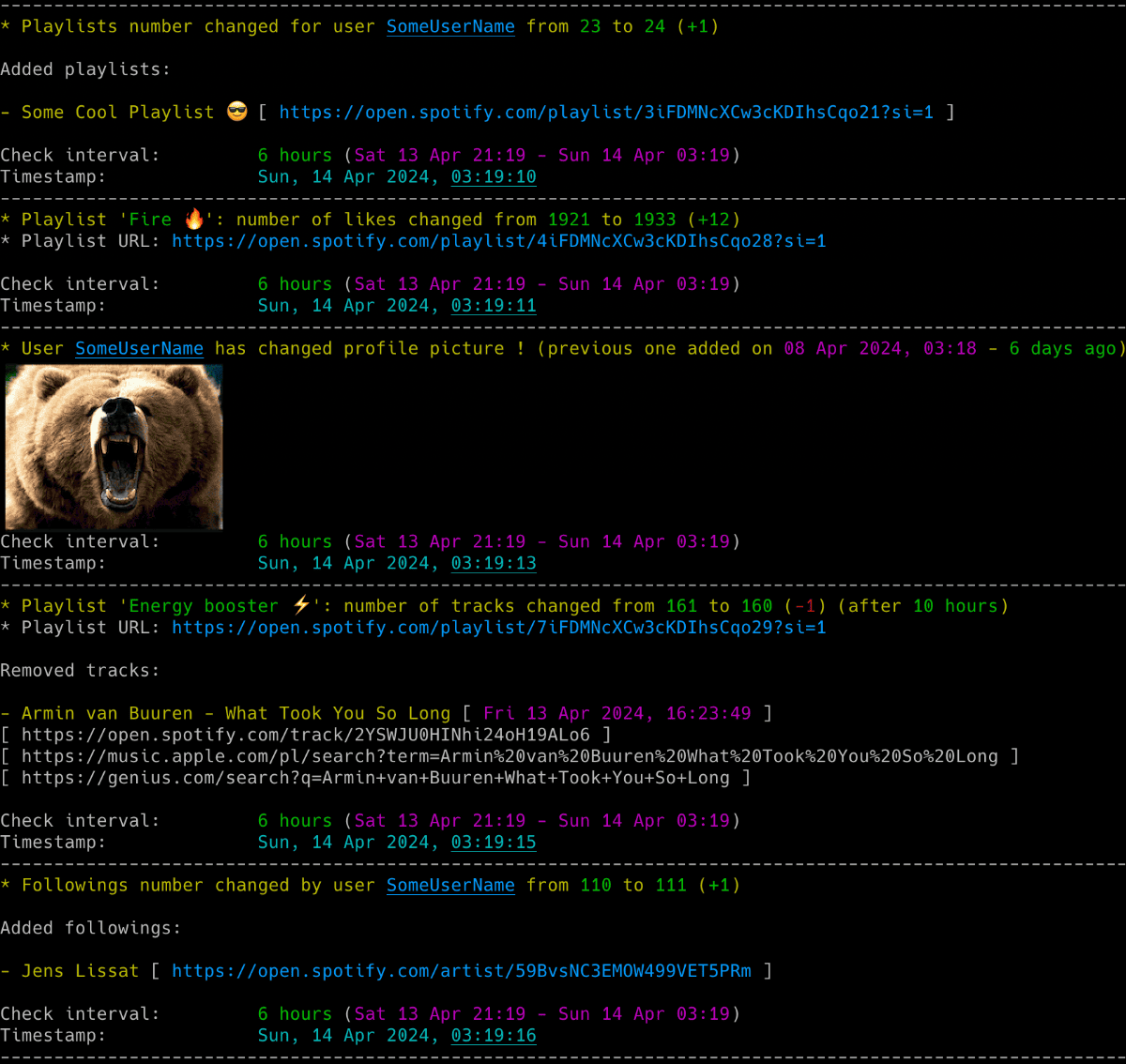
Powerful Spotify tool for real-time tracking of profile changes, playlist updates, follower growth, collaborators and more - delivered straight to your terminal, inbox or webhook.
New to Python or unsure what is installed? Follow the Python install walkthrough first.
Install from PyPI:
pip install spotify_profile_monitorRun the setup wizard:
spotify_profile_monitor --setupThe wizard asks for the target, the Spotify login and optional notifications. Review the settings before saving them. See Setup & First Run for the browser login import and the manual cookie steps.
For the manual single-file method, optional extras and upgrade commands, see Installation.
- Detect added or removed playlists and tracks.
- Track playlist names, descriptions, likes and collaborators.
- See who added each track to a collaborative playlist.
- Track username and profile-picture changes.
- See when followers or followed accounts are added, removed or renamed.
- View profile details and recently played artists.
- Receive alerts in the terminal, by email, through Discord or through ntfy.
- Read coloured terminal output with a customizable theme, while log files stay plain text.
- Keep a timestamped CSV history of profile and playlist changes.
- Include profile pictures and optional playlist or album artwork in notifications.
- List or export tracks from playlists and Liked Songs.
- Search for Spotify users by name.
- Open music and lyrics searches across Spotify, YouTube Music, Apple Music, Tidal and other services.
- Use the automatic web-player playlist backend without creating a Spotify developer app.

✨ If you want to track Spotify friends' music activity, check out another tool I developed: spotify_monitor.
🛠️ For Spotify Web Player token and secret-key utilities, see Debugging Tools.
Use Quick Install & Run above for first-time setup. The table uses PyPI commands. For the manual script equivalents, see Run Individual Commands.
Replace the target placeholders with a complete Spotify profile URL, a spotify:user: URI or a user ID.
| I want to... | Run this |
|---|---|
| Configure the target, credentials and alerts | spotify_profile_monitor --setup |
| Start monitoring with existing authentication | spotify_profile_monitor <spotify_target> |
| Check authentication, connectivity and one target | spotify_profile_monitor --doctor <spotify_target> |
| Import a Spotify login from a browser | Open Spotify Web Player in the browser, sign in then run spotify_profile_monitor --import-browser-cookie --browser firefox |
Enter or replace securely a manually extracted SP_DC_COOKIE |
Run spotify_profile_monitor --set-sp-dc and enter sp_dc at the hidden prompt |
| Configure and test webhook alerts | Use the setup wizard or follow Webhook Settings |
| Save an SMTP password for email alerts | spotify_profile_monitor --set-smtp-password |
| Send a test email | spotify_profile_monitor --send-test-email |
| Save a new webhook URL | spotify_profile_monitor --set-webhook-url |
| Send a test webhook | spotify_profile_monitor --send-test-webhook |
| Show profile details, followers, followings and playlist statistics | spotify_profile_monitor <spotify_target> -i |
| Display or export the tracks of one playlist | spotify_profile_monitor -l <playlist_url> -b tracks.csv |
| Find a Spotify user ID by name | spotify_profile_monitor -s "user name" |
| List every supported command-line flag | spotify_profile_monitor --help |
Running the tool with no arguments offers the wizard if you have not saved a target. If a target is already saved, it starts monitoring that target.
The tool runs until interrupted (Ctrl+C). Use tmux or screen for persistence and run multiple copies to monitor several targets.
For authentication, token sources, saved targets and notification setup, see the full Setup & First Run guide.
For browser profiles, manual cookie extraction, email and webhook setup, see Configuration. For notification choices, listing commands and output files, see Usage.
If a run fails, start with Doctor Preflight.
Full documentation is available at misiektoja.github.io/spotify_profile_monitor:
| Page | What it covers |
|---|---|
| Installation | Python walkthrough, PyPI or manual installation, upgrades |
| Setup & First Run | Setup wizard, browser cookie import, the first monitoring run |
| Configuration | Config file, token sources, targets, time zone, SMTP, webhooks, storing secrets, check intervals |
| Usage | Monitoring mode, listing mode, notifications, CSV export, blacklisting, signals, terminal output |
| Troubleshooting | --doctor preflight checks, what to do when something fails, --verbose and --debug output |
| Debugging Tools | TOTP token testing and secret key extraction |
| Testing | Running the offline suite, the linter and the docs build |
| About | Change log, contributing, security, license, support |
See RELEASE_NOTES.md for details.
Bug reports, documentation fixes and code contributions are welcome. See CONTRIBUTING.md for the development setup, the checks CI enforces and what a change needs before it is merged. Participation is covered by the Code of Conduct.
Report a suspected vulnerability privately through GitHub security advisories, never as a public issue. SECURITY.md covers the reporting process, the supported versions and the security posture of stored secrets, configuration loading and untrusted Spotify text.
- misiektoja (@misiektoja)
- tomballgithub (@tomballgithub)
Licensed under GPLv3. See LICENSE. Dependency licenses are listed in THIRD_PARTY_NOTICES.md.
Questions, bug reports and vulnerability reports each have a place, listed in SUPPORT.md.
If the project is useful to you, you can support its development through GitHub Sponsors or Buy Me a Coffee.