- With DocPHT you can take notes and quickly document anything and without the use of any database.




Donate to help keep this project maintained.

⭐ If you use it, you should star it on Github! It's the least you can do for all the work put into it!
Assign Tasks to Groups or from Multi-Select of Users with permissions from the project
Kanboard v1.1.0 or Higher, except 1.2.45 to 1.2.48.
Group_assign Version 1.8.3 will support Kanboard 1.2.45 to 1.2.48.
Group_assign Versions 1.7.7 and below will support PHP version below 7
- A task can have an assigned group or selection of users
- Can only assign groups or other assigness to a task that have permissions in the Project.
- If a user is in a group that a task is assigned to, it will show up on their dashboard.
- If a user is in other assignees multiselect that a task is assigned to, it will show up on their dashboard.
- If a user is in a group that a task is assigned to, it will show up in their calendar.
- If a user is in other assignees multiselect that a task is assigned to, it will show up in their calendar.
- If a group is assigned or a user is assigneed in other assignees, it will be appear on the task in detail view, board view, creation, modification.
- Includes 5 Automatic Actions to utilize the Assigned Group
- Email Assigned Group on Task Modification, Creation, Close, or Movement
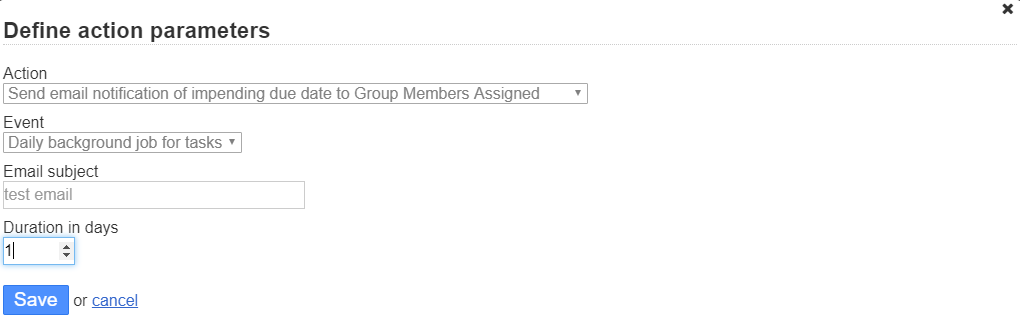
- Email Assigned Group of impending Task Due Date
- Email Other Assignees on Task Modification, Creation, Close, or Movement
- Email Other Assignees of impending Task Due Date
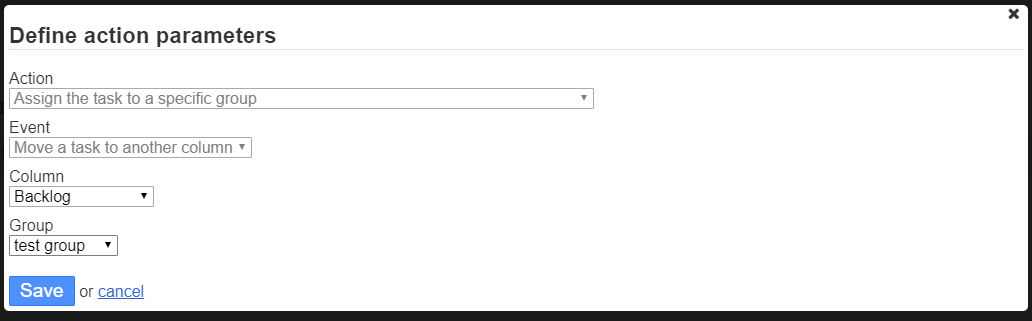
- Assign task to a group on creation or movement
- using
allassignees:me(assignee:mefor pre 1.7.3 versions) in filter will find tasks assigned to groups that the user is in or assignee in other assignees is in. - using
allassignees:GroupName(assignee:GroupNamefor pre 1.7.3 versions) in filter will find tasks assigned to a group by NAME of the group. - using
allassignees:GroupID(assignee:GroupIDfor pre 1.7.3 versions) in filter will find tasks assigned to a group by ID number of group. - using
allassignees:Usernameorallassignees:Namewill find all tasks assigned to that user regardless of how they have been assigneed, whether in the group or in Other Assignees or Assignee. - User assigneed via a group or multiselect will now recieve notifications
- Changing assigned group or any multiselect users will now trigger
EVENT_ASSIGNEE_CHANGE - Duplicating Tasks will include assigned groups and other users.
- Duplicating to another project or moving to another project will check permissions of assignees, and remove those without permission.
- Task Reccurences will include group assigned and other assignees in the recurrence.
- Setting included to enable group managment for Application Managers
- Found in
Settings > Application settings
- Found in
The plugin registers these Kanboard JSON-RPC methods. All writes reject groups and users that are not assignable in the target project and return false on validation failure.
Creates a task with the standard Kanboard createTask arguments plus:
| Extra argument | Meaning |
|---|---|
group_id |
Assigned Group id. Use 0 for no group. |
other_assignees |
Array of user ids for Other Assignees. Use [] for none. |
The plugin stores these fields as tasks.owner_gp and tasks.owner_ms. When there are no Other Assignees, owner_ms is kept as 0; the plugin does not keep empty multiselect containers as task assignments.
Updates a task with the standard Kanboard updateTask arguments plus group_id and other_assignees.
Warning: this method keeps the historical overwrite behavior:
- omitted
group_idclears the Assigned Group (owner_gp = 0); - omitted
other_assigneesclears Other Assignees (owner_ms = 0); owner_id = nullpreserves the current main assignee;- do not pass
other_assignees = null; pass an array, or omit it only when you intend to clear.
Prefer patchTaskGroupAssign() when you only need to change group/other-assignee fields.
Returns:
{
  "task_id": 123,
  "group_id": 45,
  "other_assignee_ids": [7, 8],
  "other_assignees": [
    {
      "id": 7,
      "username": "alice",
      "name": "Alice",
      "email": "alice@example.com",
      "avatar_path": "",
      "is_active": 1
    }
  ],
  "multiselect_id": 67
}
other_assignees contains only public user fields. multiselect_id is an internal container id; use other_assignee_ids for API updates.
Safely updates only the assignment fields passed by the caller:
- omit
group_idor passnullto preserve the current Assigned Group; - pass
group_id = 0to clear the Assigned Group; - omit
other_assigneesor passnullto preserve current Other Assignees; - pass
other_assignees = []to clear Other Assignees; - pass
other_assignees = [1, 2]to replace Other Assignees with exactly those users.
Safe merge flow:
- Call
getTaskGroupAssign(id). - Merge your intended
group_idorother_assignee_idschange locally. - Call
patchTaskGroupAssign(id, group_id, other_assignees). - Call
getTaskGroupAssign(id)again and verify the returned assignment.
Find bugs or missing functionality, please report it.
- Add a few basic automatic actions that utilize Groups assigned
- Add relationship for
allassignees:Usernameorallassignees:Namein the table lookup - Add an event for assigned group change.
- Incorporate into notifications
- Address Task Duplication
- Task Recurrence
- Find the release you wish to install: https://github.com/creecros/Group_assign/releases
- Download the provided zip, not the source zip, i.e.
Group_assign-x.x.x.zip - Unzip contents to the plugins folder
In the event that you use the master repo, ensure that the directory of the plugin is named Group_assign, or else the plugin will not work.
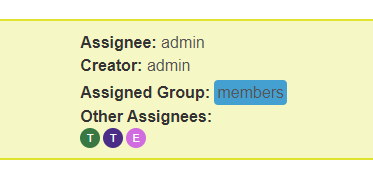


- Tasks that a user is assigned too but not main assignee will show up in calendar, with Dark Grey Background and Task color Border, to differentiate that they are not the main assignee.