
Manage Strimzi resources — Apache Kafka on Kubernetes — from the Headlamp UI.
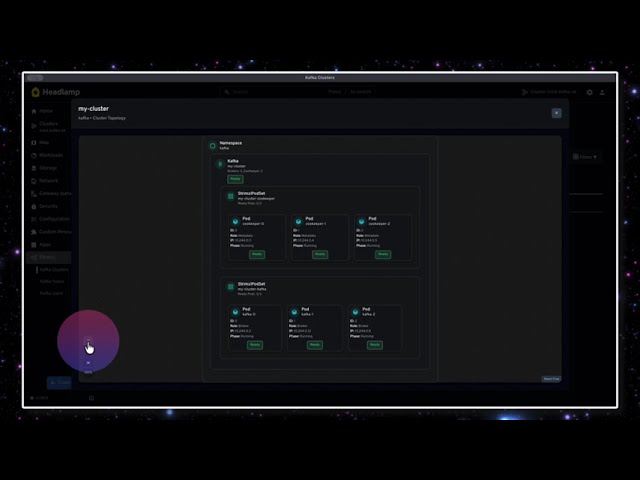
- Kafka clusters — status, version, replicas, and KRaft or ZooKeeper mode, plus a topology view of node pools and pods
- Topics — create, edit and delete, with partitions, replicas, retention, compression and min in-sync replicas
- Users — create and delete, with SCRAM-SHA-512 or TLS authentication and ACL rules; view the generated password or certificate
- Connect clusters — replicas, version, bootstrap servers, the REST endpoint, and the connector plugins the operator found
- Connectors — desired state against runtime state, per-task detail, and pause, resume or start in one step; values that look like credentials stay masked until you ask for them
- Resource map — Strimzi resources appear on Headlamp's map, linked to the cluster they belong to
- Works across namespaces, with search and sorting on every list
- Headlamp 0.22 or later
- A cluster running the Strimzi operator. Both API versions work:
v1beta2on Strimzi 0.x, andv1on Strimzi 1.0 and later. The plugin checks which one the cluster serves and uses it.
From a release archive:
# macOS
mkdir -p ~/Library/Application\ Support/Headlamp/plugins/strimzi
tar -xzf *strimzi-headlamp-*.tar.gz \
  -C ~/Library/Application\ Support/Headlamp/plugins/strimzi --strip-components=1

# Linux
mkdir -p ~/.config/Headlamp/plugins/strimzi
tar -xzf *strimzi-headlamp-*.tar.gz \
  -C ~/.config/Headlamp/plugins/strimzi --strip-components=1
Then restart Headlamp.
From npm:
npm install @acesaro/strimzi-headlampWith Headlamp server:
headlamp-server -plugins-dir=/path/to/pluginTo run Headlamp in your cluster with the plugin, see deploy/.
All of these are served as kafka.strimzi.io/v1 or v1beta2, depending on the
operator version. StrimziPodSet comes from core.strimzi.io.
| Resource | What you can do |
|---|---|
Kafka |
View spec and status, listener addresses, and KRaft or ZooKeeper mode; open the topology view |
KafkaNodePool, StrimziPodSet |
Shown in the topology view, with an inline JSON editor |
KafkaTopic |
Create, edit and delete. Set partitions, replicas, retention, min in-sync replicas, and compression (gzip, snappy, lz4, zstd, producer) |
KafkaUser |
Create and delete, with SCRAM-SHA-512 or TLS authentication and simple ACL rules on topics, groups and the cluster. Reveal the generated password or certificate |
KafkaConnect |
View spec, status, the REST endpoint, and the connector plugins the operator found |
KafkaConnector |
View the full config and the per-task state; pause, resume or start. Credential-like config values stay masked until revealed |
Connect clusters are read-only on purpose. Their spec covers images, config, TLS and authentication, which are easier to keep in YAML.
Connector actions send a JSON merge-patch to spec.state, so the rest of the
resource is untouched. This is safe for connectors managed by GitOps.
npm install
npm run build      # writes dist/
npm run test       # unit tests
npm run lint       # eslint
npm run tsc        # type check
npm run package    # build a .tar.gz
npm run storybook  # component workbench
npm run licenses   # regenerate THIRD-PARTY-LICENSES.md
Layout:
src/
├── components/   UI, with detail views under one folder per resource
├── resources/    KubeObject classes for the Strimzi CRDs
├── hooks/        shared React hooks
├── utils/        pure helpers, covered by the unit tests
├── mapView.tsx   resource map sources
└── index.tsx     routes, sidebar and registration
Guides:
- Local testing — run the plugin against a cluster
- Demo walkthrough — set up a cluster and tour the UI
- Storybook — component workbench
- Releasing — version, tag and publish
Apache 2.0 — see LICENSE.
The build bundles its runtime dependencies into dist/main.js. Their licences
are listed in THIRD-PARTY-LICENSES.md, which ships
with every release archive.