L-System Greenhouse renders beautiful L-System images on your computer! Written by
Eric Bergman-Terrell.
L-Systems (Lindenmayer Systems) are scripts written in a simple formal grammar, consisting of a starting string, called an axiom, and rewrite rules, called productions.
The axiom is converted into output by using the productions to convert letters in the axiom. Then the output can be converted, for a specified number of iterations. The final output can be displayed graphically by converting it into "turtle graphics" commands:
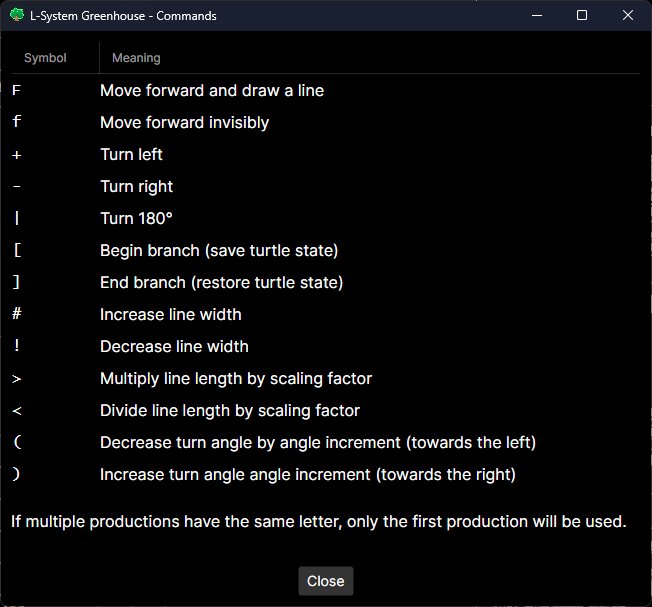
Remarkably, these simple grammars can generate graphics of spectacular beauty.


Open the sample files in the release to generate some striking images. They're in the "Sample L-System Greenhouse Files" folder.
L-System Greenhouse runs on Windows or Linux. It could be easily updated to run on Apple OSX machines.
Go to the "L-System Greenhouse\L-System Greenhouse\deploy" folder. Run "deploy-all-framework-dependent.ps1" or "deploy-all-self-contained.ps1".
The framework dependent build scripts will create relatively small executables, which will require that .NET 9 has already been installed.
The self-contained scripts will create relatively large executables which will not require a previous .NET 9 installation.
L-System Greenhouse was developed in the C# programming language, using Avalonia, which allows developers to create .NET UI apps for Windows, Linux, and OSX.
The app was developed with the JetBrains Rider IDE.
After building the app, use the scripts in the "deploy" folder to generate the executable and dependencies.